Use this free refinance calculator to compare your current Australian home loan with a proposed refinance. Estimate repayments, fees, savings and break-even time using your own figures.
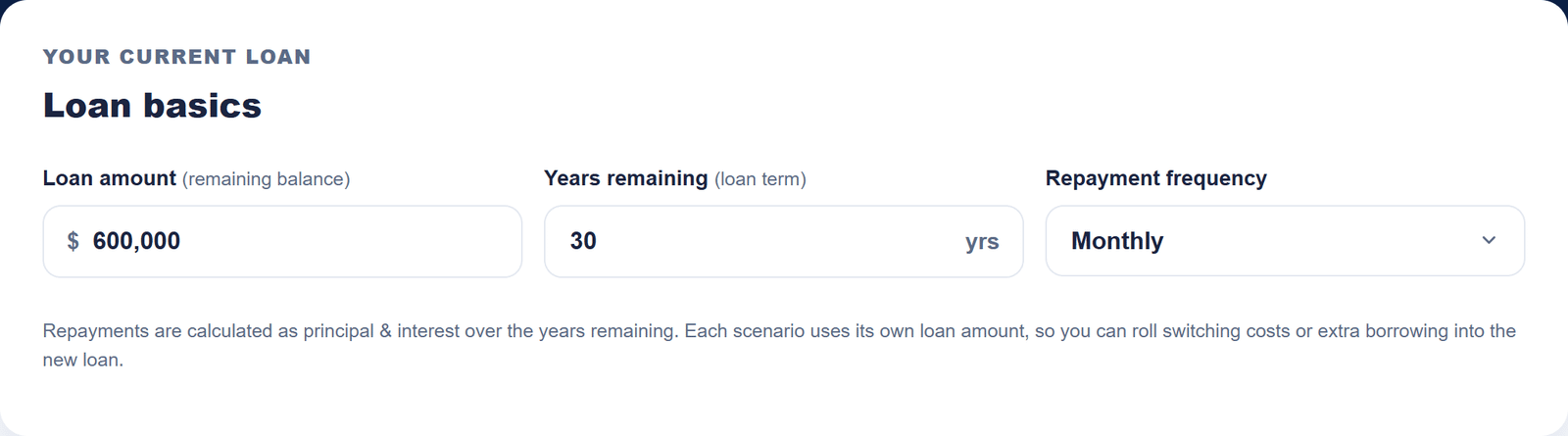
Repayments are calculated as principal & interest over the years remaining. Each scenario uses its own loan amount, so you can roll switching costs or extra borrowing into the new loan.
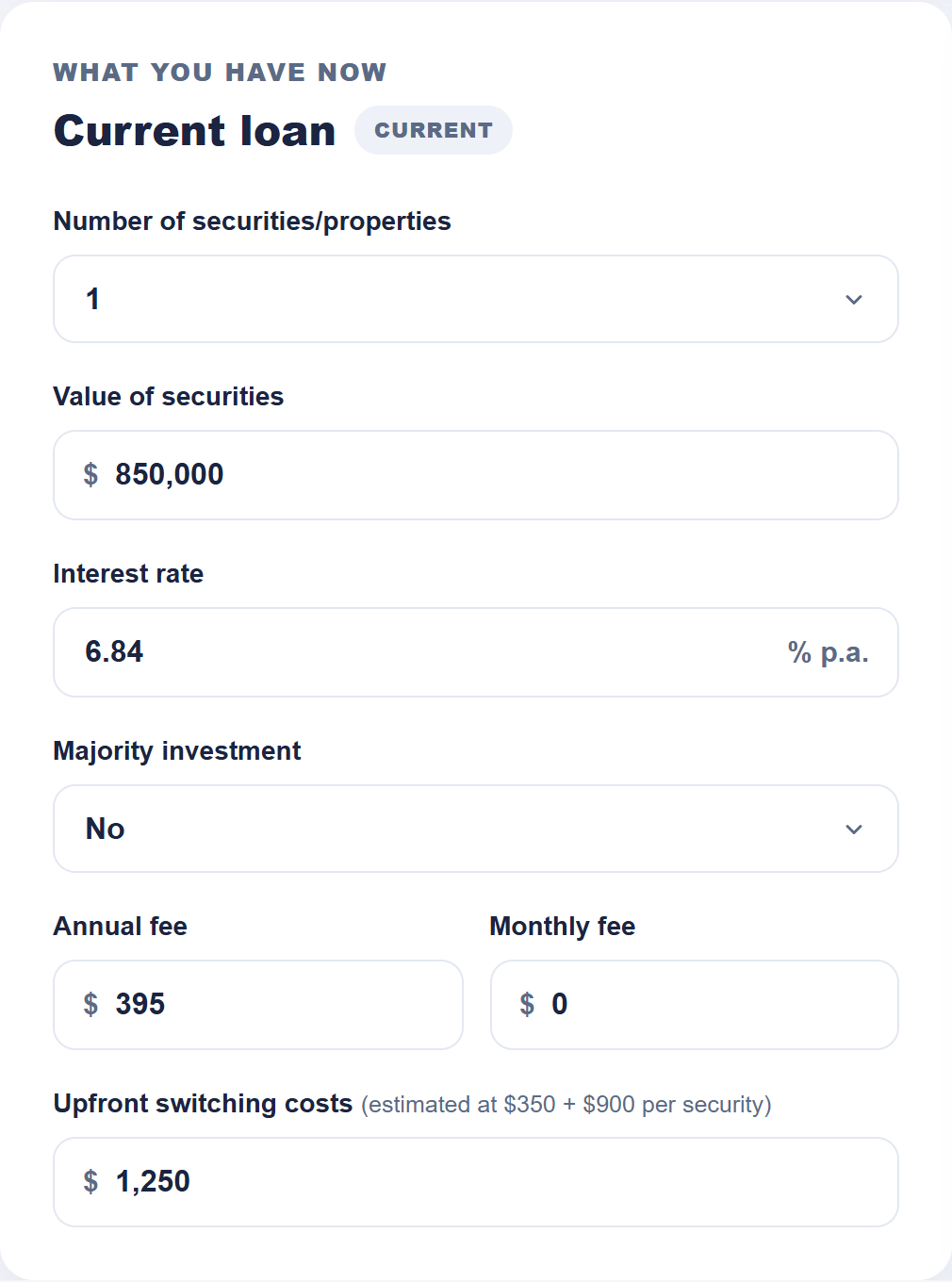
What you have now
Current loan Current
$
% p.a.
$
$
$
Your refinance scenario
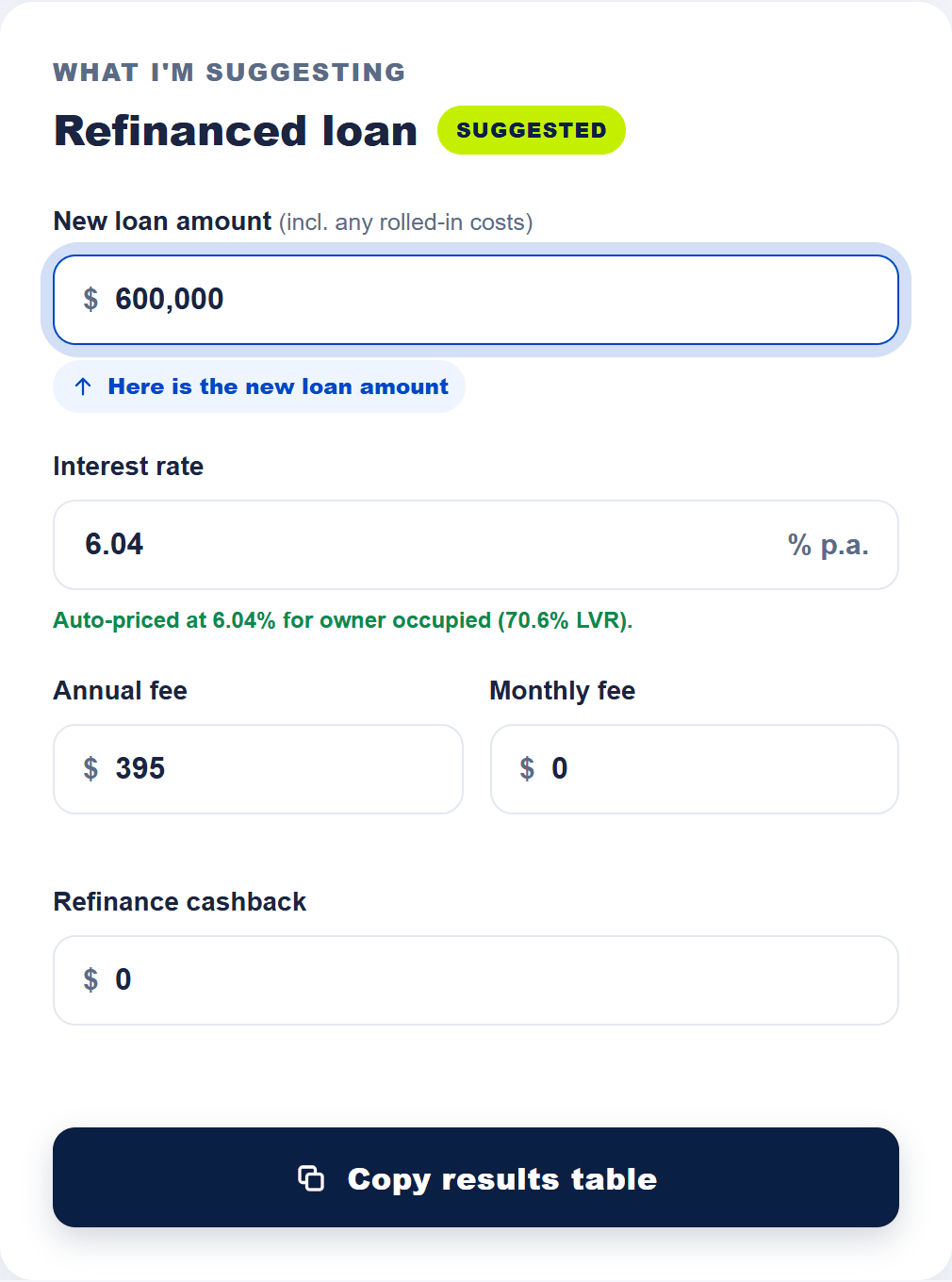
Refinanced loan Suggested
$
Here is the new loan amount
% p.a.
Enter your property value to load an illustrative rate, or enter your lender's offered rate.
$
$
$
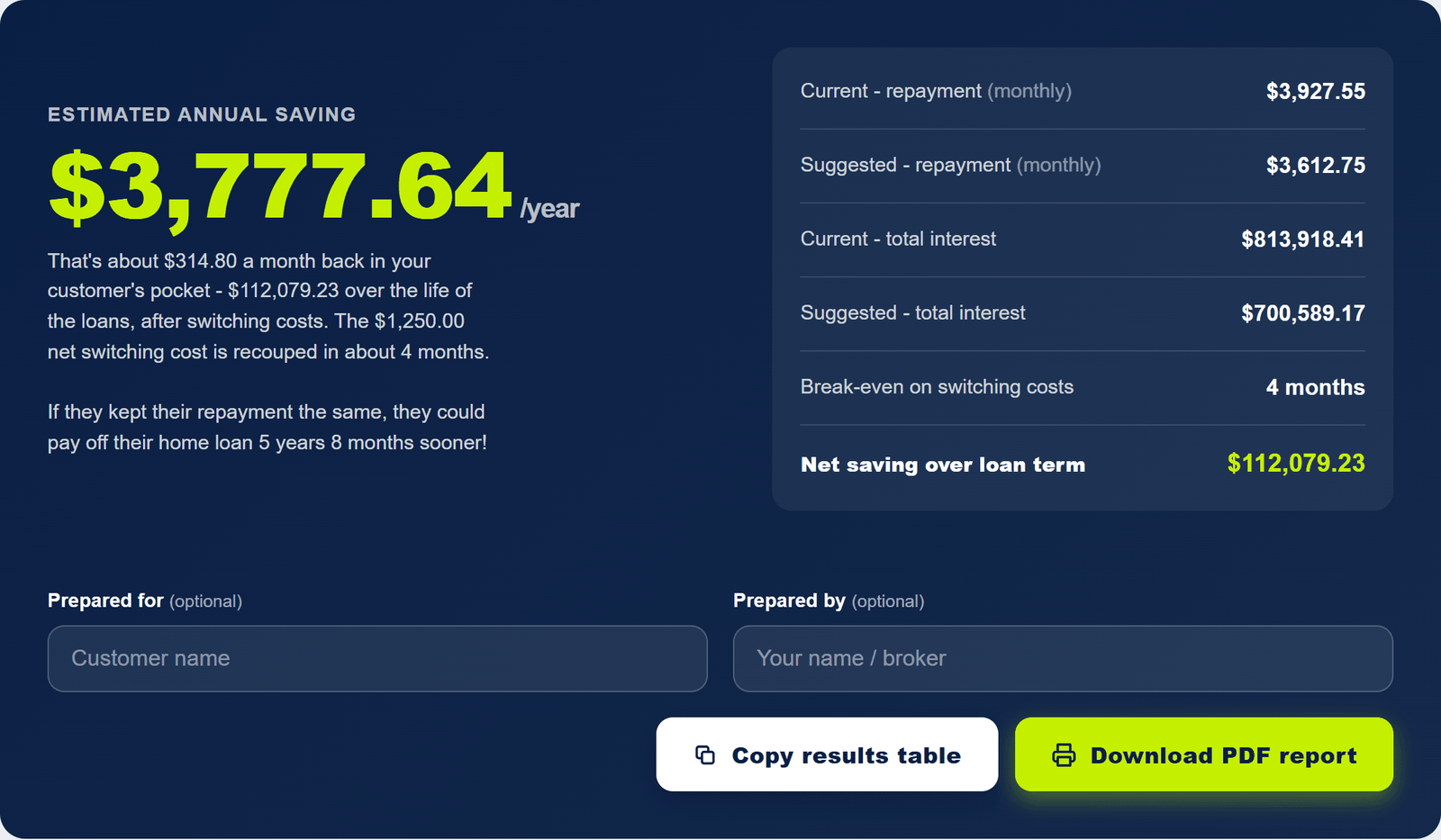
Estimated annual saving
$0/year
Enter the loan details above to compare estimated annual costs.
Current - repayment (monthly)
$0
Suggested - repayment (monthly)
$0
Current - total interest$0
Suggested - total interest$0
Break-even on switching costs-
Net saving over loan term$0
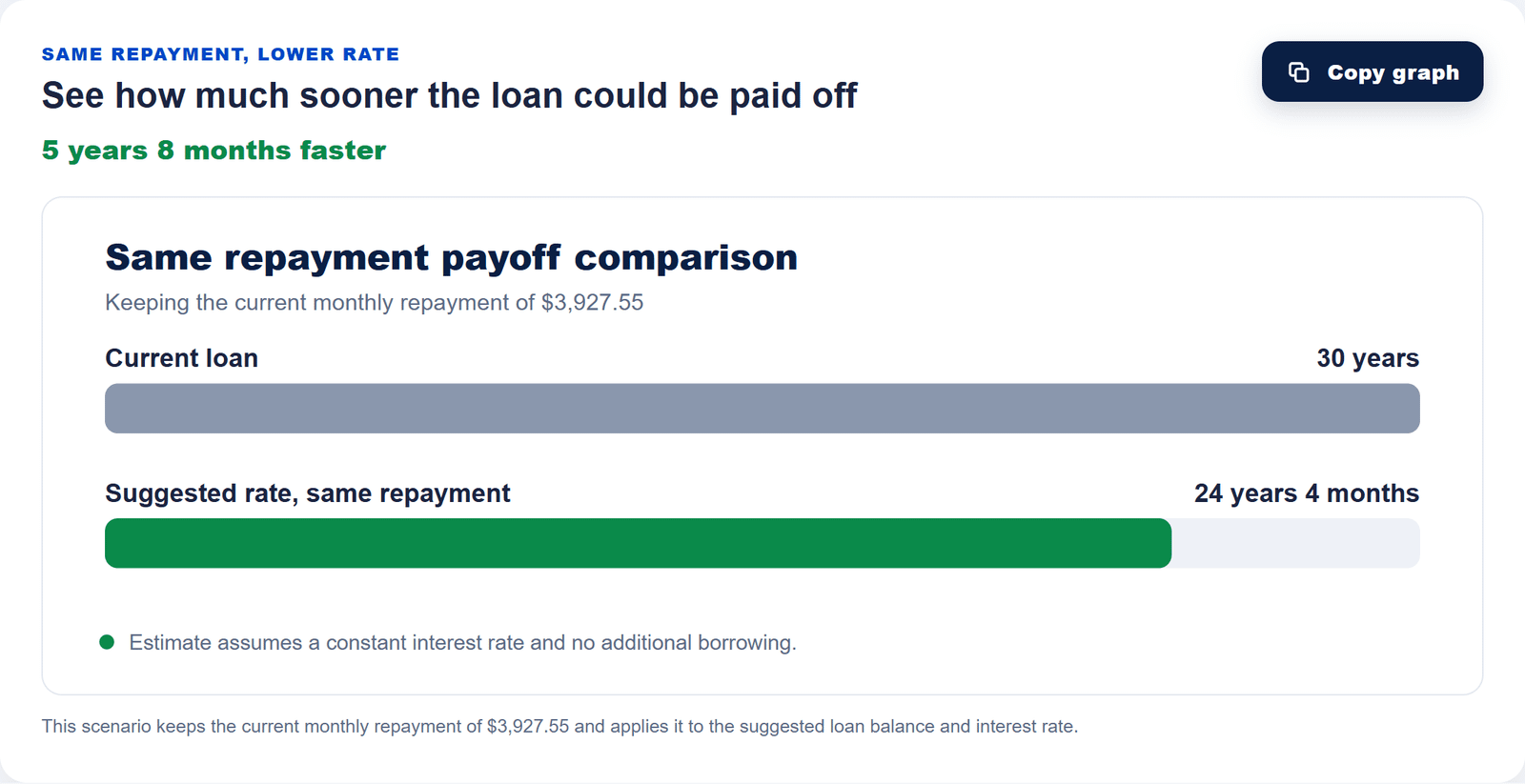
Same repayment, lower rate
See how much sooner the loan could be paid off
Calculating…
Why use this tool
What does a home loan refinance calculator compare?
A refinance calculator estimates how a new home loan could change repayments and total costs. This free tool puts the current and proposed loans side by side, then shows what the difference may mean each year and over the remaining term. Use it to explore a decision at your own pace; the results are estimates, not lender quotes.
LOOK AT THE WHOLE COST
RepaymentsOngoing feesSwitching costs
One complete comparison
1
Compare more than rates
See principal and interest repayments alongside annual and monthly account fees. A lower advertised rate can still cost more when the other terms change.
ILLUSTRATIVE COST RECOVERY
$4,200Switching costs
÷
$200Monthly saving
=
21Months
Constant saving, no cashback in this example.
2
Put switching costs in context
Enter an upfront cost and cashback to estimate net switching cost, break-even time and saving over the term.
75%Example LVR
SEE THE BALANCE IN CONTEXT
$600,000 loan $800,000 property value
Illustration only; not a borrowing limit.
3
Test the balance you would borrow
Set a different proposed loan amount if you expect extra borrowing. The two loans are calculated from their own balances.
EXPLORE YOUR PAYOFF PATH
Current pathSame payment, lower rate
Concept diagram; your result depends on your inputs.
4
See a same-payment payoff path
Compare how long the suggested loan might take to repay if you kept making the current repayment amount.
Make the numbers tangible
A lower payment is only part of the picture.
Explore how costs and time change the outcome. These examples are separate from your calculator results.
Illustrative example
Lower ongoing cost
Switching costs
$4,200
Monthly saving
$200
Break-even
21 months
Net saving is monthly saving × months, minus switching costs. This example assumes a constant saving and no cashback.
Choose a guide below. Each annotated screenshot uses illustrative inputs, with arrows and labels pointing to the fields or result to check. Rates and lender costs can change; enter your own figures for a personal comparison.
How to calculate refinance savings
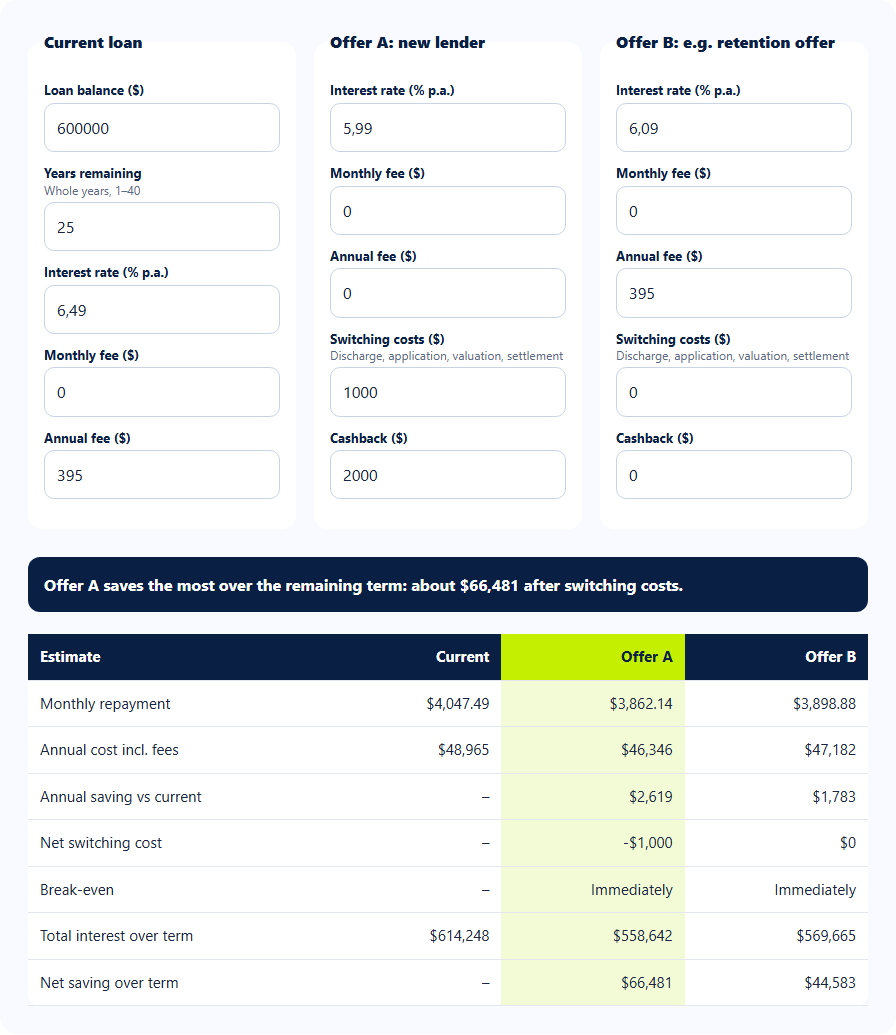
Enter the balance and term left on your current loan, then add its rate and fees. Enter the proposed loan balance, rate and fees. The calculator compares estimated annual costs and subtracts net switching costs from the saving over the remaining term.
Step 1: use the balance you still owe and the years left, not the original loan amount and term.
Step 2: enter the current rate and fees. The property details also help form the indicative suggested rate.
Use your latest statement. Confirm the remaining balance, current interest rate and ongoing fees.
Match the term. The tool applies the same years remaining to both loans, which makes this a like-for-like term comparison.
Review the proposed loan. Check its balance, rate, fees, cashback and switching cost before relying on the saving.
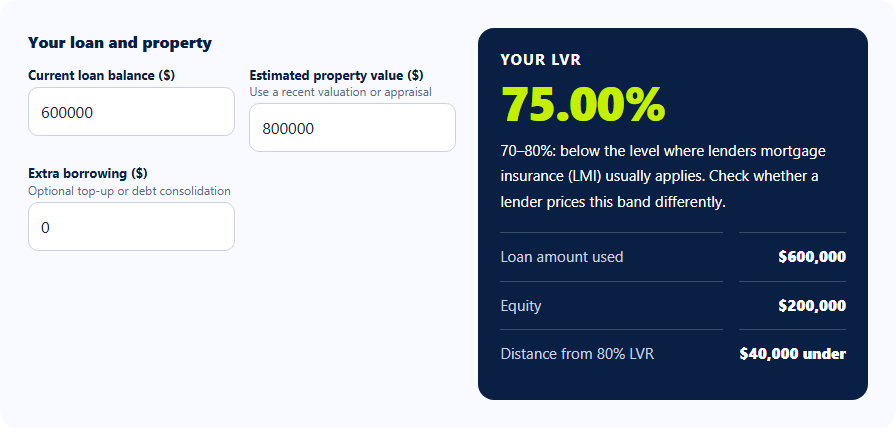
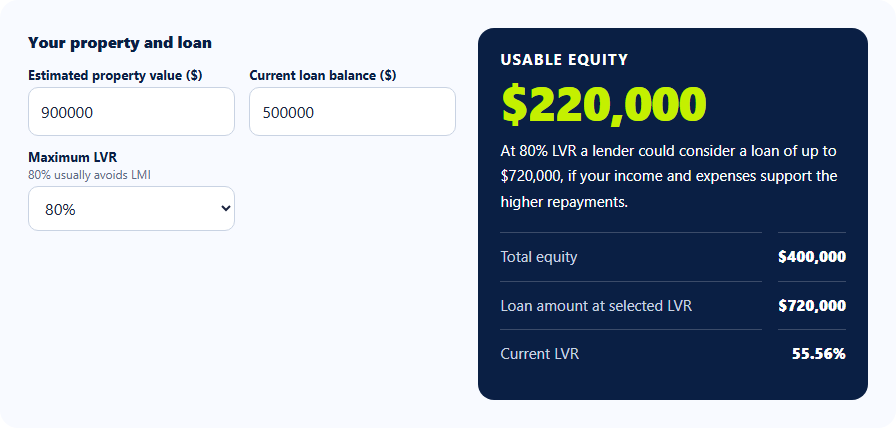
Loan-to-value ratio (LVR) is the current loan balance divided by the value of the securities, multiplied by 100. For example, $600,000 ÷ $850,000 × 100 is about 70.6% LVR. This tool uses LVR and the majority-investment selection to show an indicative suggested rate.
The on-screen rate is an indicative calculator input, not a live lender offer. Confirm actual pricing and eligibility with the lender.
Enter the security value. For more than one property, use the combined value relevant to the proposed security.
Select majority investment. Choose Yes or No according to the lending purpose being modelled.
Check the suggested side. Review the proposed balance, auto-priced rate, ongoing fees and cashback. Change the proposed balance if borrowing more.
The LVR shown here uses your current balance. If you plan to borrow extra, use the refinance LVR calculator to check the proposed total loan against the property value.
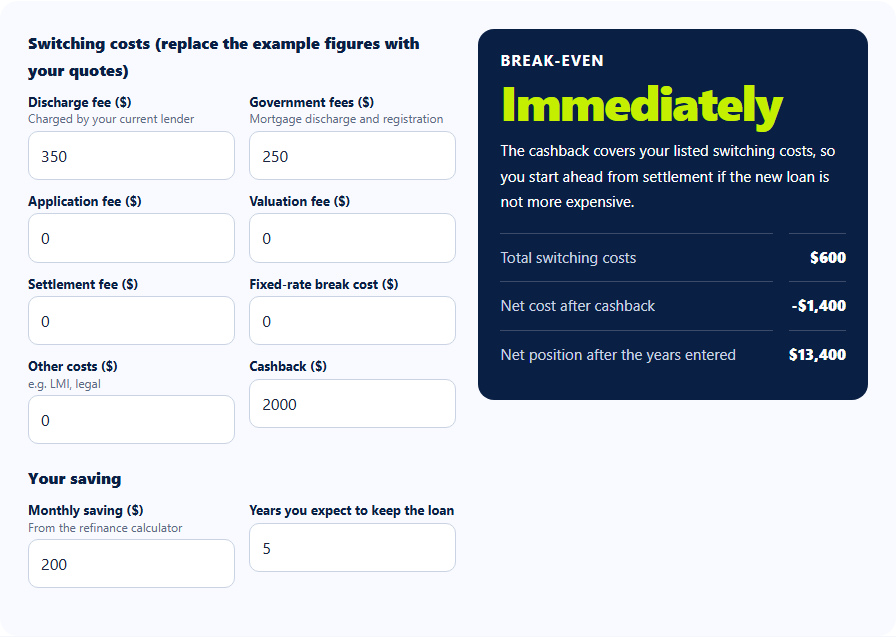
Break-even is the time it may take for estimated monthly savings to recover net switching costs. This calculator divides upfront costs minus cashback by annual savings divided by 12, when annual savings and net costs are both positive.
Illustrative example only: $1,250 of net switching costs and about $3,777.64 of annual saving produce a break-even estimate of roughly four months.
Gather switching charges. Include known discharge, application and other relevant costs in the editable upfront field.
Subtract genuine cashback. Cashback reduces net switching cost, but check its conditions and timing.
Read annual and lifetime figures separately. A positive annual saving can still take time to recover upfront costs.
The payoff chart applies your current scheduled repayment to the suggested loan balance and rate. It estimates whether keeping that payment could finish the proposed loan earlier or later than the current loan.
The chart is a constant-rate illustration. A larger new balance or a different repayment amount may change the outcome.
Check the current repayment. This amount becomes the payment used in the payoff comparison.
Review the proposed balance and rate. The chart uses both, so extra borrowing matters.
Compare payoff times. The difference describes a scenario, not a promised loan term or lender repayment schedule.
The tool supports several different comparisons, so a single page can help you test more than one refinancing question. Keep the inputs tied to the actual loan offers you are considering.
Switching to a lower-rate loan
Compare a proposed rate with the rate on your current loan, then check whether fees and switching costs change the apparent saving.
Change the new loan amount to test a larger balance. More borrowing can increase repayments and interest even when the new rate is lower.
Investment or multiple-property lending
Enter the securities and property value used for the scenario, then select whether lending is majority investment. Check the indicative rate with the lender. Follow the investment-property refinance guide for proposed borrowing and purpose checks.
Before you switch
What to check before refinancing a home loan
A lower repayment is a starting point, not the whole decision. Use this checklist to turn the calculator estimate into a comparison you can verify with your current lender and a proposed lender. Keep track of the documents and quotes in the full refinancing checklist.
Check 1
Gather the actual loan figures
Use your latest statement for the balance, rate, remaining term and ongoing fees. Get the proposed lender's written rate, fees, repayment schedule and any cashback conditions. Replace the calculator's indicative rate with the offered rate when available.
Check 2
Ask your current lender to compete
Request a better rate or fee arrangement before paying to switch. Put a retention offer through the suggested-loan inputs, then compare it with the external offer on the same remaining term.
Check 3
Price every switching cost
Ask about discharge, application, valuation and settlement charges. If you are leaving a fixed-rate loan, get the lender's actual break-cost figure. Check whether lenders mortgage insurance could apply; this tool does not calculate it.
Check 4
Compare the loan features and term
Check offset, redraw, package features and any restrictions separately. A longer new term can reduce a repayment while increasing total interest. This calculator applies the same years remaining to both loans, so request a lender schedule for a different term.
The refinance mortgage calculator estimates principal and interest repayments for the years remaining, using the balance and rate entered for each loan. It assumes rates remain constant. The selected repayment frequency changes the scheduled payments; accelerated fortnightly uses half a monthly payment every fortnight.
Annual cost
Estimated scheduled repayments for one year, plus 12 monthly account fees and one annual fee for that loan.
Scheduled repayments+Ongoing fees
Annual saving
Current annual cost minus proposed annual cost. A negative result means the proposed loan costs more under these inputs.
Current annual cost−Proposed annual cost
Break-even
Net switching cost divided by the monthly equivalent of annual saving, when both figures are positive. Net switching cost is upfront costs minus cashback.
Net switching cost÷Monthly saving
Net saving over the term
Estimated total cash paid on the current loan minus the proposed loan, less net switching cost. Each schedule runs until its balance is repaid.
Current loan total−Proposed loan total−Net switching cost
What the estimate leaves out: This tool does not model offset or redraw benefits, lenders mortgage insurance, daily interest timing, future rate changes or different remaining terms for the two loans. You can enter a known fixed-rate break cost in the upfront field, but the tool does not calculate that charge for you. The suggested rate is indicative pricing built into the calculator, not a live lender quote. See Moneysmart's switching-home-loans guide for other costs and checks.
Shared report rates: The copied table and PDF show the same interest rates used for the on-screen repayment and saving estimates. Check any indicative suggested rate against the lender's actual offer.
These answers address common questions before comparing home loans. They explain what this calculator estimates and where a lender or broker needs to confirm the figures.
How do I calculate refinance savings in Australia?
Compare the annual cost of your current loan with the annual cost of a proposed loan using the same years remaining. Enter each balance, interest rate and ongoing fee, then subtract the proposed annual cost from the current annual cost. This calculator also subtracts net switching costs from its estimated saving over the term.
Use your latest loan statement and a written proposed offer where possible. The screenshot guide shows where the figures go.
How do I calculate break-even when refinancing?
Divide net switching cost by estimated monthly saving. Net switching cost is upfront charges minus cashback; estimated monthly saving is annual saving divided by 12. For example, $1,250 ÷ ($3,777.64 ÷ 12) is about 3.97 months, shown as roughly four months.
If annual saving is zero or negative, there is no positive break-even under those inputs. If cashback covers the cost, the net upfront cost may be zero or negative. See the break-even guide.
How do I calculate LVR for a refinance?
Divide the current loan balance by the value of the property securities and multiply by 100. A $600,000 balance against $850,000 of security value is about 70.6% LVR. The calculator uses that ratio and your majority-investment selection to form an indicative proposed rate.
A lender may use its own valuation and eligibility rules, so confirm the actual LVR and offer. The LVR guide shows the relevant fields.
Does a lower refinance rate always save money?
No. A lower rate may reduce repayments, but higher ongoing fees, a larger proposed balance or switching charges can reduce or erase the benefit. Compare annual cost, break-even and net saving over the term together.
A longer new term can also lower the regular payment while increasing total interest. This tool uses the same years remaining on both sides. Moneysmart advises checking costs and loan length before switching.
What refinancing costs should I include?
Enter known upfront charges such as discharge, application, valuation, registration or settlement costs in the editable switching-cost field. Add any fixed-rate break cost if it applies and you have a lender figure. The fixed-rate refinance guide shows how to use a dated break quote. Put ongoing monthly and annual account fees in their separate fields.
The default upfront number is only an estimate based on the number of securities. Replace it with actual quotes. Lenders mortgage insurance is not calculated, so assess it separately; Moneysmart lists common switching charges.
What information do I need to use a home loan refinance calculator?
Start with the remaining balance, years left, interest rate, repayment frequency and ongoing fees on your current loan. For the proposed loan, gather the amount you would borrow, the offered rate, monthly and annual fees, any cashback and the upfront costs of switching. Have the value of the property securing the loan ready to estimate LVR.
A recent statement and a written lender offer are better sources than an advertised headline rate. The before-you-switch checklist explains which figures need separate confirmation, including break costs, LMI and loan features.
What should a home loan refinance calculator include?
A useful home loan refinance calculator should let you enter the current and proposed balances, interest rates, remaining term, ongoing fees, switching costs and any cashback. Look for clear repayment, saving and break-even estimates with the assumptions explained.
This calculator also estimates LVR and payoff time at the same repayment. It does not calculate lenders mortgage insurance, offset or redraw benefits, future rate changes, lender eligibility or live offers. Use your loan statement and the proposed lender's written figures to check any result before deciding whether to switch.
When might refinancing a home loan not be worth it?
Refinancing may not pay off when switching costs take too long to recover, the new loan has higher ongoing fees, or the lower repayment depends on extending the term. A larger new balance can also outweigh a lower interest rate. Compare annual saving, break-even time and estimated total cost together, then check any offset or redraw features the calculator does not model.
Can I use this calculator for an investment refinance or multiple properties?
Yes, you can model a majority-investment scenario and select the number of securities. Enter the value of the securities relevant to the proposed loan. The tool uses those inputs to estimate LVR and its indicative proposed rate.
Mixed-purpose lending, valuations and product eligibility can be more complex than these inputs show. Ask the lender or broker to confirm the structure and rate.
Does this refinance mortgage calculator include offset accounts or LMI?
No. It does not calculate offset or redraw benefits, or lenders mortgage insurance (LMI). Those features can materially affect the real cost of refinancing. Compare them separately with the lender's product terms.
Sana's broader mortgage repayment calculator supports more detailed scenario settings, including offsets. This page focuses on the current-versus-proposed refinance comparison.
Can I compare a new 30-year term with my current remaining term?
Not directly here. The years-remaining input is applied to both loans so repayments are compared over the same term. If a proposed lender restarts the loan over 30 years, that may lower the regular payment but increase total interest.
Do the copied table and PDF use the same interest rates as the calculator?
Yes. Both reports show the current and suggested rates used for the repayment, saving, break-even and payoff estimates. They do not add a separate rate adjustment when you copy or print a result.
The suggested rate may be filled from an indicative preset based on the loan and property details you enter. Replace it with the lender's actual offered rate when available, and verify both rates against your loan documents.
Is this free refinance calculator a lender quote or personal advice?
No. It gives general estimates from the figures you enter and the calculator's stated assumptions. Actual lender results can differ because of daily interest, payment dates, changing rates, fees, valuation and product rules.
Confirm figures and suitability with the lender or a licensed mortgage broker before acting. The tool does not assess eligibility or recommend a particular credit product.
Who is behind the tool
About Sana Hosseni and this calculator
Sana Hosseni is a mortgage broker with more than 23 years of mortgage and finance broking experience. He has been an elected director of the Mortgage & Finance Association of Australia (MFAA) Board since 2025. His background combines broking, accounting and practical loan comparisons.
Sana also owns loancalculator.mortgage, a comprehensive free mortgage repayment calculator. His aim is to make complex home-loan comparisons clearer and more practical. This refinance calculator reflects his broking experience and his focus on repayment structures, interest, fees, offsets and repayment strategies. This particular tool models rates, repayments, fees, switching costs and payoff scenarios; it does not model offset balances.
The calculator is free to use without registering or booking an appointment. Use it to explore a scenario, then confirm current rates, product features and your circumstances with a lender or broker. Page updated .
Send us a question about the calculator or your scenario.
No obligation. Your calculator remains free to use.
CONTACT REFINANCE CALCULATOR AU
Tell us how we can help.
Share your question and the best way to reach you. Fields marked * are required.
We’ll use your details to respond to your enquiry. Calculator inputs are not sent automatically. Please don’t include account numbers or documents. Privacy policy.
Here is what your inputs suggest
Based on the figures entered, the estimated annual difference is:
$0.00
estimated each year
Would you like help understanding this result?
Keep using the calculator for free, or send us a question about your comparison. Getting in touch is optional.
We’ll use your details to respond to your enquiry. Calculator inputs are not sent automatically. Please don’t include account numbers or documents. Privacy policy.
Details handled securelyNo obligationHelp with your question
Thanks for getting in touch.
We have received your question and will use the details you shared to respond. You can continue using the free calculator at any time.
Know someone who might find this calculator useful?
 Refinance Calculator AU